

Microsoft 365 Apps for Enterprise (Office 365)
General
The Microsoft 365 Apps for Enterprise (AfE) are locally installable Office applications. In terms of functionality, they largely correspond to Microsoft Office LTSC.
Differences:
- Activation of the software
- AfE via user's M365 account
- Office LTSC via KMS service
- Upgrade with new features
- AfE monthly
- Office LTSC approximately every three years
- Possible use
- AfE on any device, max. 5 PCs and 5 tablets and 5 mobile devices (for details see Online Service Terms, p. 24ff)
- Office LTSC on a maximum of one personal computer per employee and on "public" computers (pool computers, laboratory computers, loan devices, etc.) (for details, see Product Terms, p. 74, paragraph 2.6). Employees are also permitted to use it at temporary workstations.
Deployment
- Download the software via the M365 Cloud Portal;
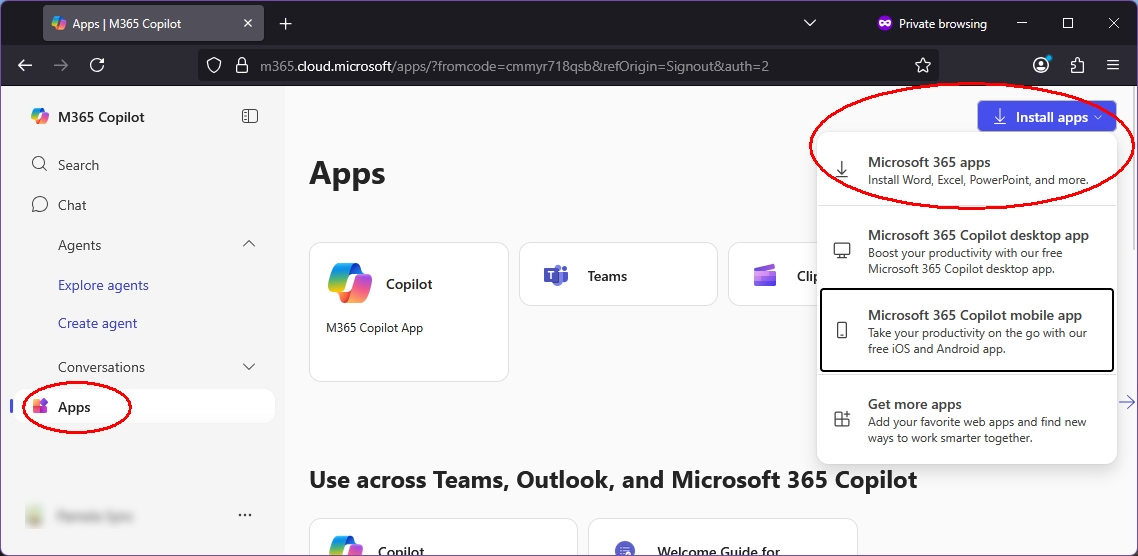
- Activate your Microsoft 365 Apps for Education with your M365 account .
Included services
Microsoft 365 Apps for Enterprise includes, among other things: the following services:
- Word, Excel, PowerPoint, OneNote, Outlook, Teams, Publisher, and Access (Publisher, Access not for Mac)
- 5 installations per user on PC or Mac - usable locally or offline
- Additionally 5 installations on mobile devices and 5 installations on tablets
- Free updates
Technical Requirements (M365)
- A valid M365 account at KIT is required to use services in the Microsoft Cloud.
- Employees and GuP must have set up 2FA for their KIT account
- An active internet connection is required to use the online functions (VPN is not required)
- Latest versions of the web browsers MS Edge, Chrome, Safari or Firefox
- Recommended system requirements for using M365 in companies
Data protection & data security in M365
For the use of applications and the storage of data in the Microsoft Cloud (M365), the following apply at KIT
- the service agreements on the introduction and operation of Microsoft 365 dated 15.02.25 for the two locations Karlsruhe and Garmisch-Partenkirchen
- the information classification guideline provided by the Information Security Officer (ISB) (available shortly)
- as well as the data protection information for the use of M365
When storing data in the Microsoft Cloud (M365), the regulations for deprovisioning at KIT are observed.
Licenses for the M365 Account
What licenses does an M365 account have?
- The Microsoft 365 Education licensing program bundles both cloud-based and locally installable Microsoft products in various licensing plans (A1, A3, A5). KIT is licensed for Microsoft 365 A3 via the EES contract.
- M365 licenses are assigned to M365 accounts at KIT by default and are dependent on a person's role. This allows employees, students, guests and partners (*GuP) to use approved services and applications.
- If extended licenses are required, these must be applied for and the costs must be borne by the requesting organizational unit. Please contact the IT representative of your OU.
- Certain agreements and guidelines also apply to the activation of additional applications.
Important: An account renewal does not change the contract status of a person at KIT! Assigned licenses and/or access authorizations are therefore no longer valid after a person leaves or exmatriculates. Accordingly, replacement licenses must be obtained from the person'sorganizational unit at KIT (OU) responsible for the person.
(*GuP) Guests & Partners do not get a licence for Microsoft 365 Apps for Enterprise (Office 365 Desktop)